Sample setup
Consider the following network diagram:
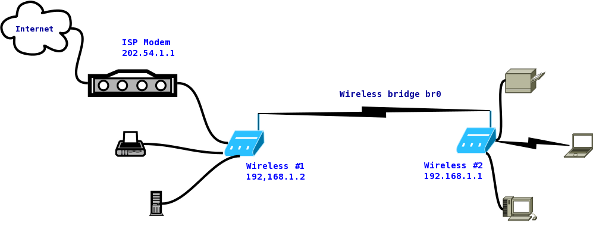
Fig.01: Wireless client setup
You connect to the Internet using standalone ADSL2 modem with 202.54.1.1 public IP address.
a titre d'exemple, c'est l'adresse IP déjà existante du modem
SSID set to nixcraft on wireless # 1 and an IP address set to 192.168.1.2. This router is located in downstairs and connected to ADSL2 modem.
SSID set to nixcraft on wireless # 2 and an IP address set to 192.168.1.1. This router works in client bridge mode and located in upstairs.
All computers and devices connected to wireless router #1 and #2 can share files and other resources with each other.
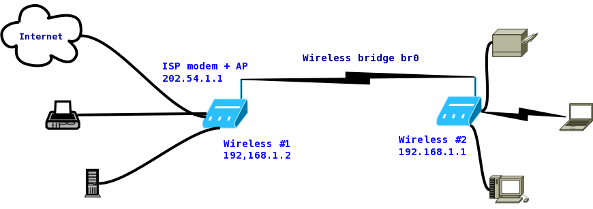
Fig.02: Access point as a wireless bridge
Where,
This setup saves electricity and resources by removing standalone ADSL 2 modem.
You connect to the Internet using combo ADSL2 modem plus wireless router (AP) with 202.54.1.1 public IP address. This router is called wireless #1 and SSID is set to nixcraft. This device has two IP address and it is located in downstairs.
SSID set to nixcraft on wireless # 2 and an IP address set to 192.168.1.1. This router works in client bridge mode and located in upstairs.
All computers and devices connected to wireless router #1 and #2 can share files and other resources with each other.
Software (3rd party firmware)